Step1 : Create and populate the relevent master-detail tables.
SQL> CREATE TABLE EMPLOYEE
( ID NUMBER PRIMARY KEY,
FIRST_NAME CHAR(30),
LAST_NAME CHAR(30) );
( ID NUMBER PRIMARY KEY,
FIRST_NAME CHAR(30),
LAST_NAME CHAR(30) );
SQL> CREATE TABLE ADDRESS
(ID NUMBER,
STREET CHAR(30),
CITY CHAR(30),
STATE CHAR(10),
COUNTRY CHAR(30),
POSTAL_CODE CHAR(30));
(ID NUMBER,
STREET CHAR(30),
CITY CHAR(30),
STATE CHAR(10),
COUNTRY CHAR(30),
POSTAL_CODE CHAR(30));
SQL> ALTER TABLE ADDRESS
ADD FOREIGN KEY(ID) REFERENCES EMPLOYEE(ID);
ADD FOREIGN KEY(ID) REFERENCES EMPLOYEE(ID);
SQL> INSERT INTO EMPLOYEE VALUES (1,'King','Canber');
INSERT INTO EMPLOYEE VALUES (2,'Dehan','Duncan');
INSERT INTO EMPLOYEE VALUES (3,'Grant','Gibson');
INSERT INTO EMPLOYEE VALUES (2,'Dehan','Duncan');
INSERT INTO EMPLOYEE VALUES (3,'Grant','Gibson');
SQL> INSERT INTO ADDRESS VALUES ( 1,'Street1','City1','State1','Country1','Code1');
INSERT INTO ADDRESS VALUES ( 1,'Street12','City12','State12','Country12','Code12');
INSERT INTO ADDRESS VALUES ( 2,'Street2','City2','State2','Country2','Code2');
INSERT INTO ADDRESS VALUES ( 3,'Street3','City3','State3','Country3','Code3');
INSERT INTO ADDRESS VALUES ( 1,'Street12','City12','State12','Country12','Code12');
INSERT INTO ADDRESS VALUES ( 2,'Street2','City2','State2','Country2','Code2');
INSERT INTO ADDRESS VALUES ( 3,'Street3','City3','State3','Country3','Code3');
Step 2: Create the employee report .
Step3: Drag and drop the sub-report , you will be prompt the sub-report dialogue box.
proceed with "create new report" and then write the query as
select * from addresswhere id = $P!{ID}
Note: You have to create a parmeter "ID".
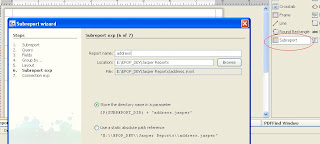 Step4 : Now you are done with the detail report.
Step5 : And then you have to send the primary key of master report(employee) to the sub report(address). So you need to pass the ID. Open the properties of the sub report and add the parameter as shown below.
 Step6 : Now you are done.


